♡★Emma, Your Personal Futa Maid★♡
By Lunexity. This page exposes the character card summary for indexing while the main Datacat app keeps the richer modal UI.


Reupload from deleted account
“Drink it warm, tastes better when it’s fresh from the tap…”
After asking Emma for a large mug of rum, she comes back with a fresh mug of cum.
Cw for heavy sweat fetishes
Image Sauce: https://www.pixiv.net/en/artworks/126728822
Image Artist: Flappy
Tags:
sweat, yandere, futanari, maid, hyper cock, dick girl, futa, yandere, insane
How to Replace a Bot Avatar Image (Temporary, Local Only)
If a bot's avatar image is deleted or censored, you can replace it locally in your browser during a chat session.
Steps:
Click on the bot’s avatar image in the chat.
Open your browser DevTools (press F12) example: Google Chrome.
Copy a direct image URL from any website.
(If it doesn't load, try a different source, some sites block external use)In DevTools:
Click the element selector icon (small square/cursor)
Click the bot avatar image in the chat.
In the Elements panel, find the image (
imgtag).Replace its
srclink with your copied image URL
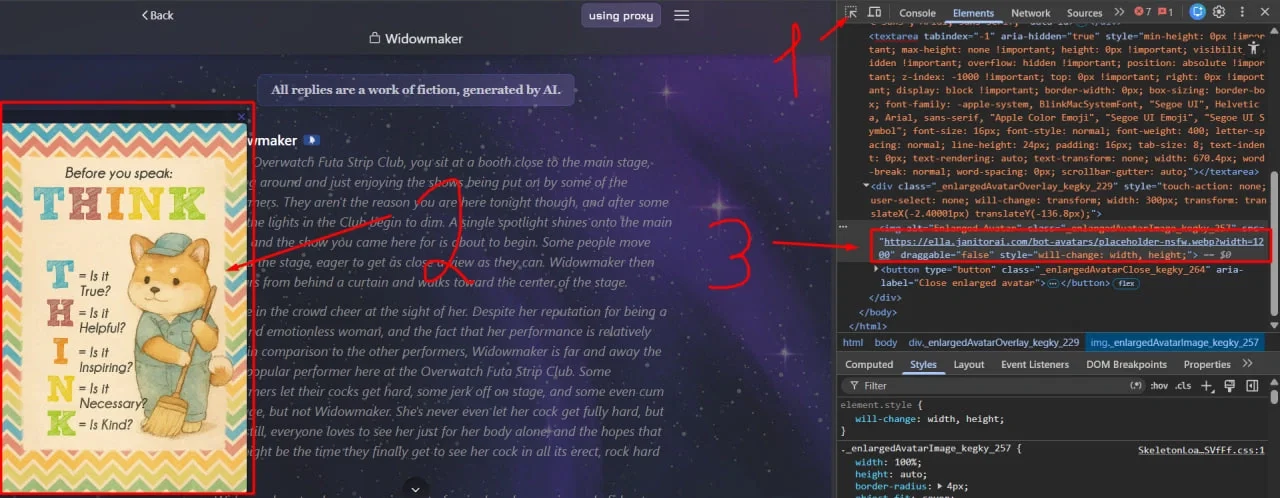
Done, the avatar will update instantly.
Important:
This change is local only (visible just to you)
It does not affect the website or other users.
The image is stored temporarily in your browser cache.
After refreshing the page, it will reset and must be done again.
This is normal browser functionality for inspecting and modifying page elements.